

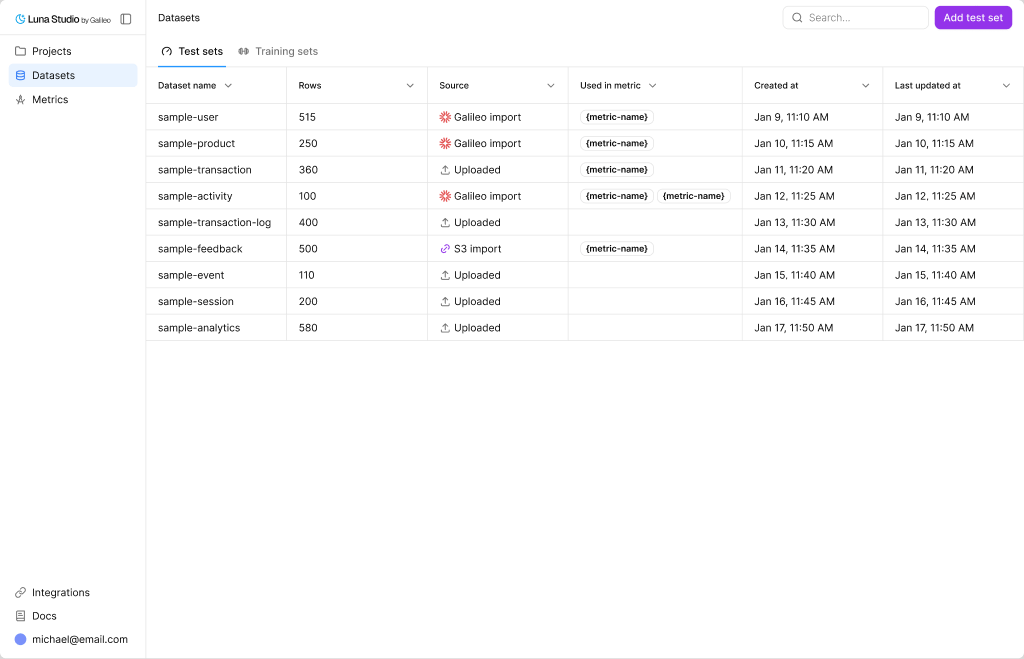
Datasets page with the Test sets and Training sets tabs
Test sets vs. training sets
Luna Studio splits datasets into two flavors, accessible via tabs on the page:Test sets
Small, hand-labelled datasets used to evaluate fine-tuned metrics. Required for every run.
Training sets
Larger datasets used to fine-tune the base model. Often generated from a test set.
Datasets table
Both tabs use the same column layout:
Click any row to view the dataset.
Top-bar actions
- Search — filter by dataset name.
- Add test set / Add training set — primary button. The label tracks the active tab. Opens the Add dataset modal — see Add a dataset.
How datasets relate to runs
Each training run consumes exactly one test set and one training set. The same dataset can be reused across many runs. The Used in metric column on the datasets table shows you which metrics’ fine-tuning depends on a dataset — useful before deleting one.Source types
For training sets specifically, an additional source applies:
- Generated — produced by the Generate from test set flow inside the run creation flow.
Where to go next
Test sets
What test sets are, schema rules, and best practices.
Training sets
What training sets are and how to create or reuse them.
Add a dataset
Reference for the three dataset sources (Upload, URL, Galileo).
Dataset validation
What Luna checks when you add a dataset.